Checkout Flows
Build a complete sales journey behind one checkout link. Route buyers by country, add order bumps, and follow the payment with one-click upsells and downsells, all on a single order.
A checkout flow turns a single checkout link into a full sales funnel. Send each buyer to the right checkout for their country, offer order bumps on the checkout, then follow the payment with one-click upsells and downsells that are charged to the card the buyer just used. No second checkout form, no re-entering card details.
You design the journey visually by placing steps on a canvas and connecting them. CheckoutJoy runs it behind one link that you share anywhere.
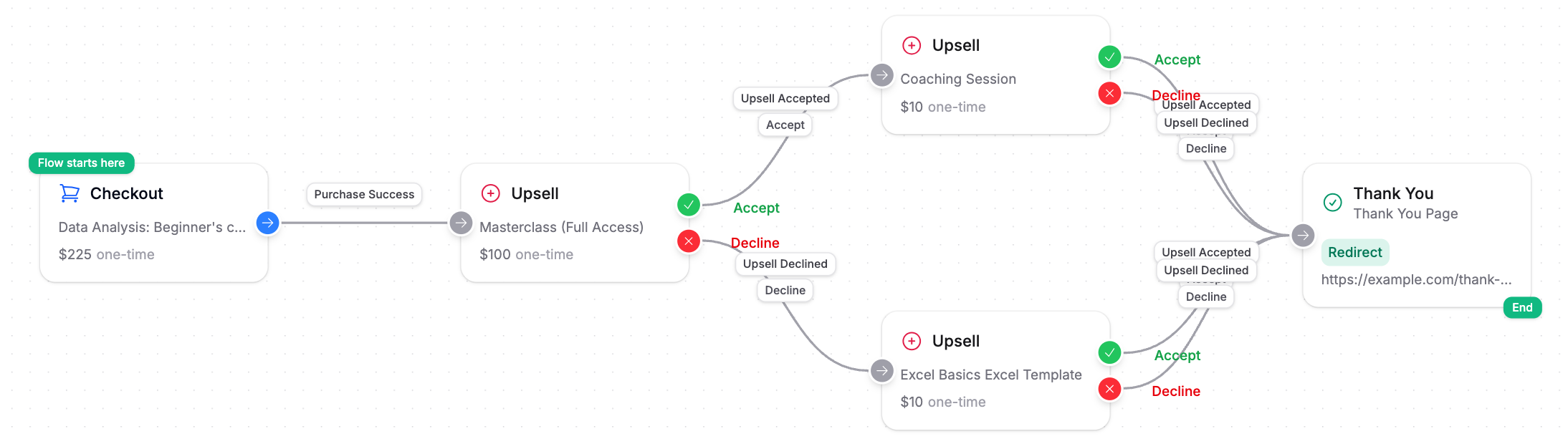
What you can build
- One-click upsells. Show an offer right after payment. One click adds it to the order and charges the card on file.
- Upsell chains. Connect an upsell's Accept exit to another upsell to keep offering the next step up.
- Downsells. Connect an upsell's Decline exit to a lower-priced offer, so a buyer who says no to the big offer still gets a second option.
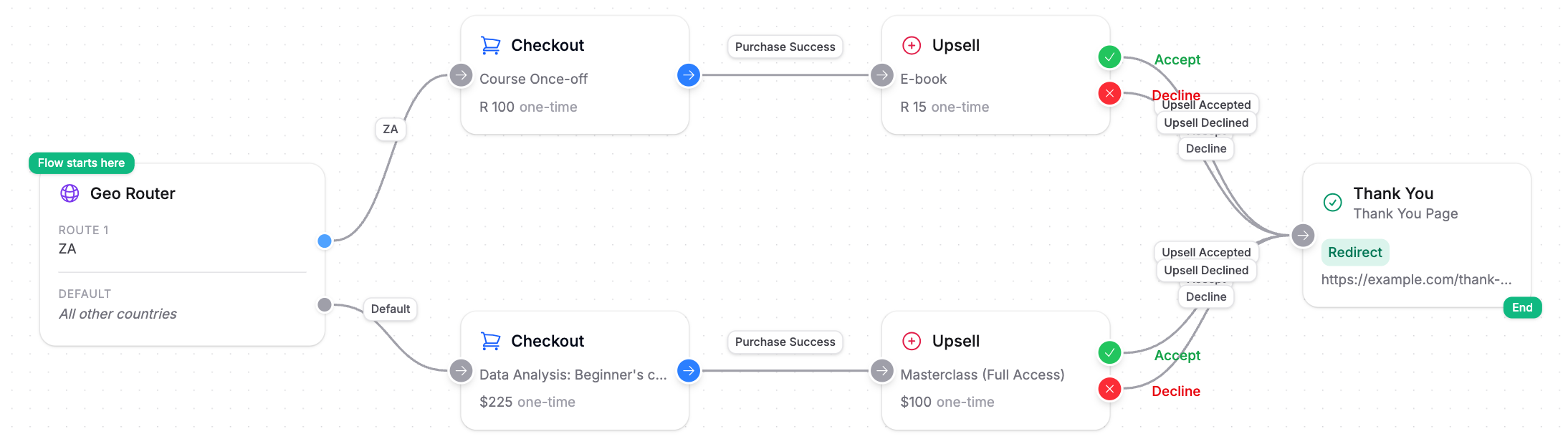
- Country-based checkouts. Start the flow with a Geo Router to send each country to its own checkout, with its own processor, currency and price.
- Order bumps. Every checkout in a flow shows the order bumps you set up on that product's checkout.
These combine freely. The flow below sends South African buyers to a ZAR checkout and everyone else to a USD checkout, and each route gets its own upsell.
One order, one confirmation
Everything a buyer takes inside a flow lands on a single order: the main product, any order bumps, and every upsell they accept. Each accepted upsell is recorded as its own line item and its own payment on that order.
The order is completed once, when the buyer reaches the end of the flow. The confirmation email, the invoice, and your integrations (course access, CRM tags, webhooks) run once, with every item already in place.
An order bump is a checkbox on the checkout form, paid together with the main product. An upsell is a separate page shown after payment and charged separately with one click.
The building blocks
| Step | What it does | Exits |
|---|---|---|
| Checkout | A hosted checkout for one product, including its order bumps. | Purchase Success |
| Upsell | A post-payment offer page, designed in the page builder. CheckoutJoy can write the page copy for you from a few notes about the offer. | Accept and Decline |
| Geo Router | Detects the buyer's country and sends them down a matching route. Countries you don't assign go to Everyone else. | One per route, plus Everyone else |
| Thank-you page | Redirects the buyer to your success page. This is where the flow ends. | None |
A flow starts with either a Checkout or a Geo Router. A flow that starts with a Checkout has one checkout. To use more than one checkout, start with a Geo Router.
Building a flow
Start from a template
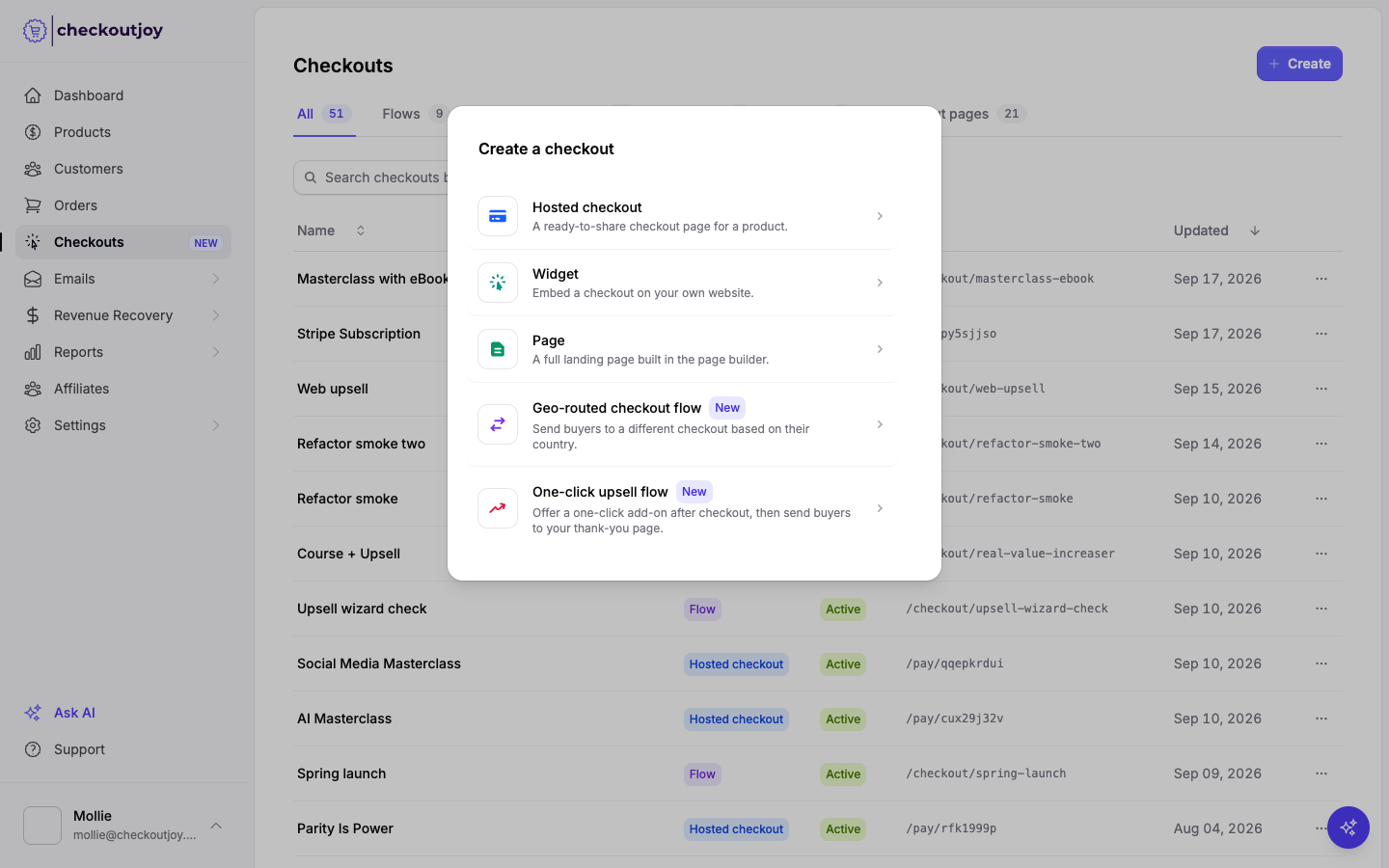
Go to Checkouts, click Create, and choose One-click upsell flow or Geo-routed checkout flow. A short wizard asks for the products and the thank-you page, then opens the finished flow in the flow builder.
Add steps
Click any exit on a step, such as an upsell's Accept or Decline, and pick the step to add. The new step is placed and connected for you. You can also add steps from the Steps panel on the left and drag a connection from an exit to the next step.
Adding an Upsell asks which page to show: create a new upsell page or reuse one you've already made.
Finish every path
Every exit should lead somewhere. Connect the last step on each path to the Thank-you page. The builder marks steps that still need attention.
Publish and share
Click Publish, then copy the flow link from the top of the builder. Until you publish, the flow is a draft and the link shows only its first step, without the rest of the flow.
Tracking performance
The Analytics tab in the flow builder shows how the whole flow performs over a date range you choose.
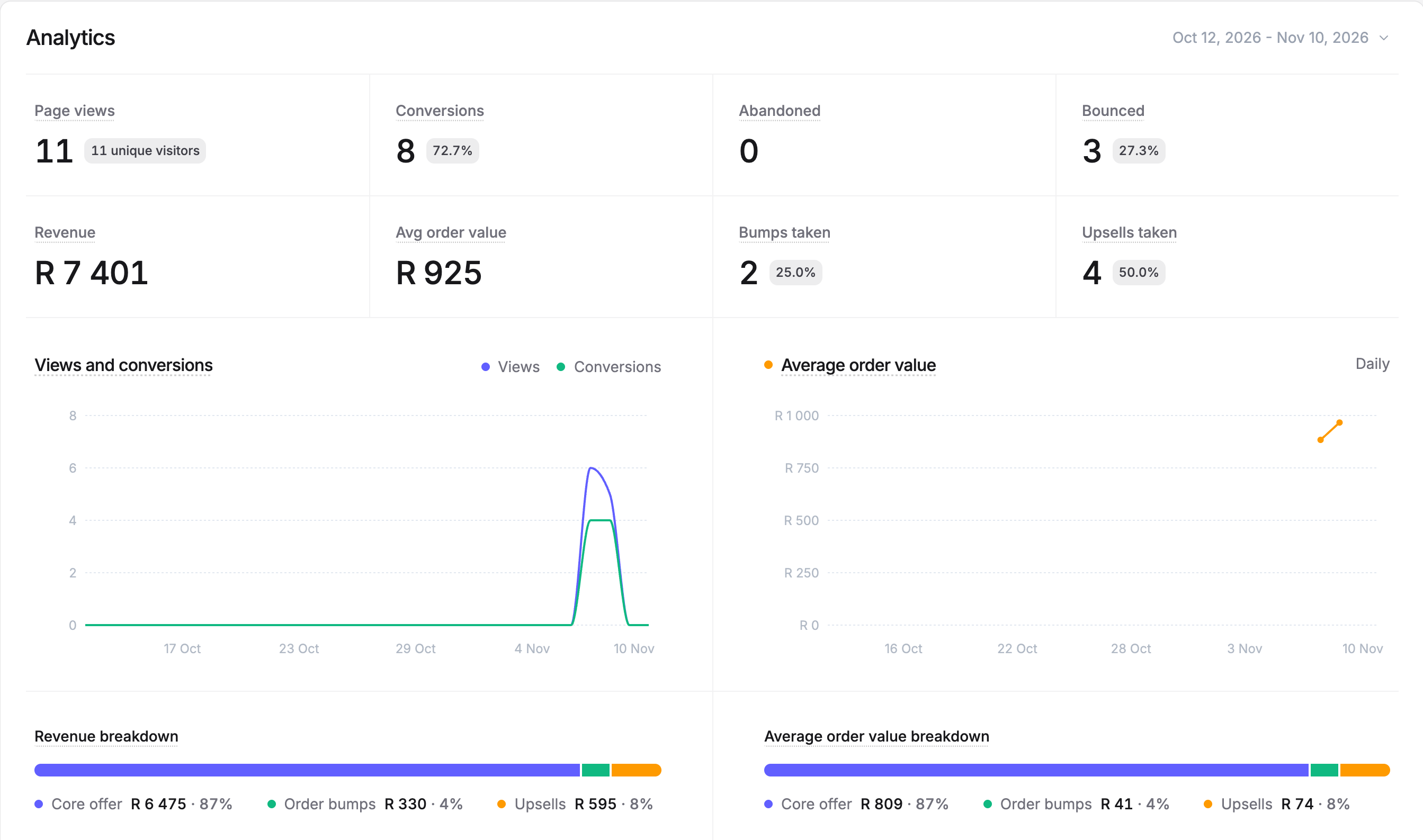
- Page views, conversions, abandoned and bounced visitors, with daily charts.
- Revenue and average order value.
- Bumps taken and upsells taken, with the share of orders that took them.
- Revenue breakdown between the core offer, order bumps and upsells, so you can see exactly what the add-ons earn.
- Country and device breakdowns of views, conversions and revenue.
Upsell requirements
One-click upsells charge the card from the checkout, so the checkout must be paid with Stripe, Paystack or PayFast, and both the main product and the upsell must be once-off products. Buyers who pay with another processor skip the upsells and go straight to the thank-you page.
That makes it safe to mix processors in a geo-routed flow: add upsells after a checkout that uses Stripe, Paystack or PayFast, and connect checkouts that use other processors straight to the thank-you page.
Full details per processor are in One-click Upsells.